

Web Fonts, and the FOIT and FOUT Phenomena
Web fonts make it easy for web developers to create sites with pleasing typography, stronger branding, and high accessibility. Unlike desktop fonts that are installed on our computers for use by applications within our local environment, web fonts are used by browsers via font files available on the web and loaded using the @font-face keyword in CSS.
Despite all the advantages they offer, using web fonts still requires a developer’s attention so as not to harm the performance of the website being built. The key to optimal web font usage is understanding web fonts themselves and how browsers handle them. Let’s dive in!
A Brief Overview of Web Fonts
Web Font Formats
Currently, there are four web font formats we can use: EOT, TTF, WOFF, and WOFF2. Unfortunately, no single format is universally supported by all browsers; the details are as follows:
- EOT is only supported by Internet Explorer
- TTF is partially supported by Internet Explorer
- WOFF is supported by most browsers, though some older versions do not support it
- WOFF2 is still in the process of adoption by some of the latest browsers
To work around this, when declaring the web font we’re using in CSS, we need to list all available formats as fallbacks. According to the CSS3 specification, src is a comma-separated priority list, so the browser will try to activate each format in the order they are listed and pick the first one that is valid.
@font-face {
  font-family: "myFont";
  src:
    url("myFont.eot?") format("eot"),
    url("myFont.woff2") format("woff2"),
    url("myFont.woff") format("woff"),
    url("myFont.ttf") format("truetype");
}
Note: the ? after the myfont.eot entry is a hack for older versions of Internet Explorer — see more details here.
What’s Actually Inside a Web Font?
A web font is fundamentally a font file. The contents of a font file are a collection of glyphs — symbols associated with specific characters that form a writing system. Each glyph is a vector image constructed from mathematical calculations. Therefore, the more complex the strokes in a font and the greater the number of glyphs, the larger the font file size.
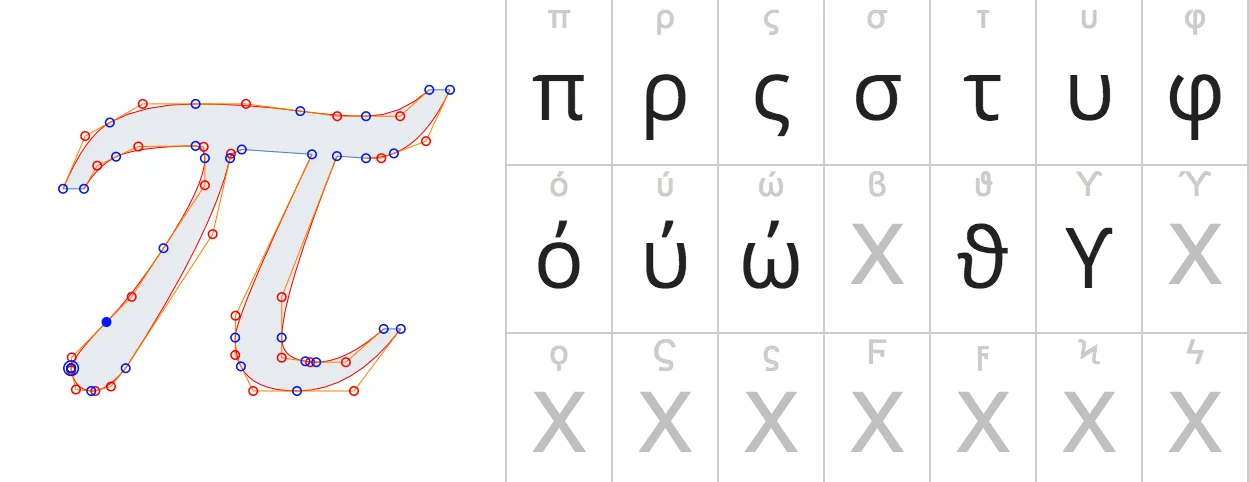
For this reason, we should decide which scripts we need on our site. For example, we don’t need the Cyrillic script if we’re not going to localise our site into languages that use Cyrillic. This font segmentation can be achieved using the CSS unicode-range descriptor.
@font-face {
  font-family: 'myFont';
  // ...
  unicode-range: U+0000-007F; // only load latin characters
}
By limiting the Unicode range in our web font definition, the font the browser needs to download will be smaller in size — and that’s a good thing.
Understanding FOIT and FOUT
The size of the web font we use is critically important! One reason is to avoid two phenomena that are frightening for a site’s user experience: Flash of Invisible Text (FOIT) and Flash of Unstyled Text (FOUT). The terms FOIT and FOUT were popularised by Zach Leatherman. Through these two phenomena we can dissect what happens behind the scenes when we use web fonts.
Both FOIT and FOUT occur at a critical moment in a site’s lifecycle: when the browser first loads the web page. FOIT is the condition where a portion of text doesn’t appear for a period of time — text that we have styled to use a particular web font. What can be confusing for users is that decorations surrounding the text, such as the background-color in the example below, are unaffected and remain visible even with no text on top of them.

FOUT, meanwhile, is the condition where text we have styled to use a specific web font is displayed in a different font for a period of time, before potentially switching to the intended font. FOUT can occur after FOIT, or it can appear at the very start of the page load without any preceding FOIT.

If you have ever used a slow internet connection, I’m sure you have encountered one or even both of these phenomena.
If your intuition tells you these phenomena are related to the process of downloading web fonts, you’re right. More specifically, both phenomena occur because of how browsers download and render web fonts. So exactly how does a browser process web fonts? We’ll cover that in the next article: Dissecting How Browsers Process Web Fonts.
Sources:
- Web font optimisation: Google Developers.
- FOIT & FOUT comparison animations: Zach Leatherman.
- Fontastic Web Performance presentation by Monica Dinculescu.