

Updating a Ghost Installation in Docker
Last month, Ghost released version 0.11.9 which brought several improvements. Like blogging platforms in general, when a new version is available, Ghost notifies its users to offer a version update. Ghost also provides an upgrade guide accessible at How to Upgrade Ghost.
That guide applies to Ghost users who are self-hosting — meaning they manage their own Ghost installation on their own server. In short, the steps involved are roughly: create a backup, download the latest Ghost installation ZIP file, extract it and overwrite the old files with the new ones, then restart Ghost.
But what if your Ghost installation lives inside Docker? The update steps are naturally different (spoiler: they’re more convenient!). Let’s take a look.
Don’t Forget to Create a Backup
First of all, even though the steps we’ll be taking won’t touch our data and content files (which are mounted from a directory outside Docker), it’s a good idea to create a backup.
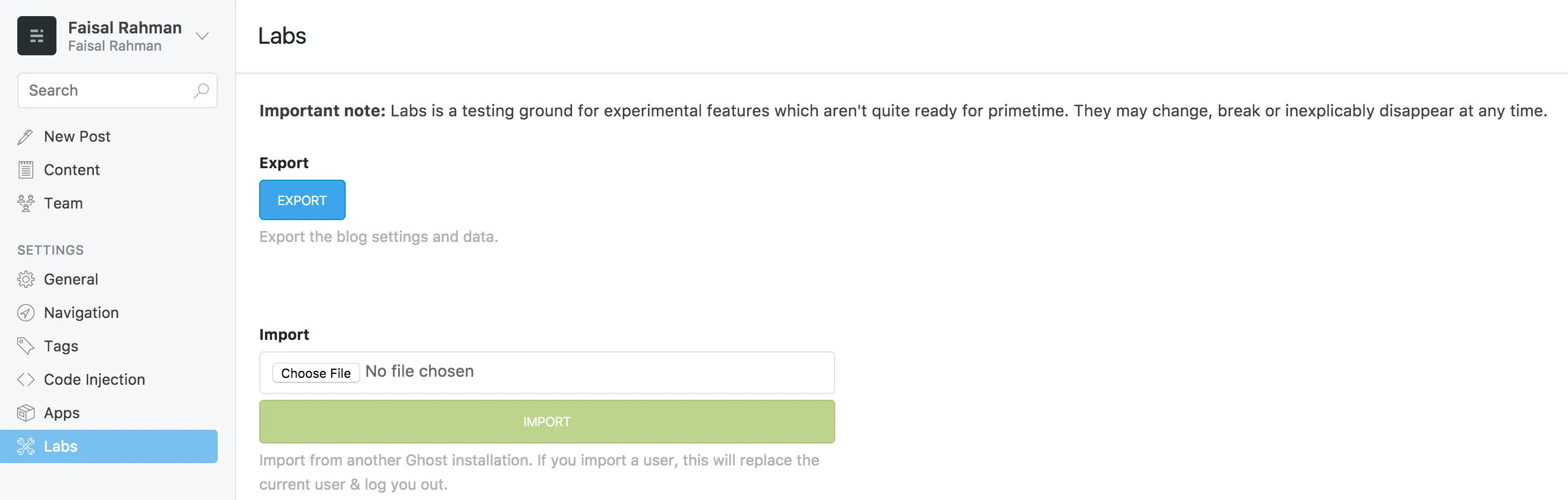
The backup facility offered by Ghost is quite impressive. With a single click, Ghost will compile all the contents of your blog into a single JSON file. Yes, everything — posts, tags, settings, code injection, and so on.
You can find this feature in the Labs menu on the Ghost administration page. Just click the Export button and save the resulting file.
Replacing the Old Container
As I discussed in my previous post, all the software needed to run Ghost is encapsulated inside a Docker container. That container is created based on an image that — in this case — we pull from Ghost’s public repository.
Uniquely, to update our Ghost version, we need to pull the latest image from that repository and create a new container based on that image.
First, stop the running Ghost container.
$ docker ps # check the container name and whether its status is up
$ docker stop ghost
Once the container has been stopped, we can safely remove it.
$ docker rm ghostNow we’ll create a new container based on the latest Ghost image. Assuming we installed Ghost following my previous post, we will run:
$ docker run --name blog -v /home/icalrn/ghost/content:/var/lib/ghost -p 80:2368 -e NODE_ENV=production -d ghostDon’t forget to adjust the --name and -p inputs to suit your needs, and also update the volume mounting -v input to match the directory where you store your Ghost content files.
If everything goes smoothly, you should be able to access Ghost at the latest version on your domain. All your content should be in place as well, since we are using volume mounting. If your data and content are missing, you can restore them from the backup file you saved earlier. If Ghost is not running, remove your Ghost container and do a clean installation as we discussed previously. Hope this helps!