

Metadata Elements in HTML
Metadata, according to Merriam-Webster Dictionary, means data that provides information about data. In an HTML document, a head section (the part of the document enclosed by the <head> tag) is provided to place various metadata that describes that HTML document. Various information can be placed there, from the site name with the <title> tag; related documents with the <link> tag, which is commonly used to link CSS documents or icons; linking documents or Javascript code with the <script> tag; all the way to custom metadata with the <meta> tag.
<!DOCTYPE html>
<html>
  <head>
    <meta charset="utf-8" />
    <title>Halaman web saya</title>
    <link rel="stylesheet" href="styles.css" />
  </head>
  <body>
    <h1>Selamat datang di web saya!</h1>
  </body>
  <html></html>
</html>
It should be noted that the ‘official’ implementation of metadata in HTML is what is declared with the <meta> tag. Nevertheless, the HTML specification also categorizes <title>, <style>, <link>, <base>, <template>, <noscript>, and <script> as metadata content. The definition of metadata content itself is content that establishes the presentation or behavior of other content in a document, or describes the relationship between the document it resides in and other documents, or represents other information.
Metadata information with the <meta> tag is described with name-value attribute pairs, except when defining character encoding. The name attribute can be provided with name, http-equiv or itemprop, while the value is provided with content.
Here are some example use cases of metadata in HTML.
Character Encoding Specification
Character encoding is the specification for mapping character data stored in bytes in memory to the letters displayed in the user interface. In an HTML document, we can specify the encoding we want to use with the <meta> tag:
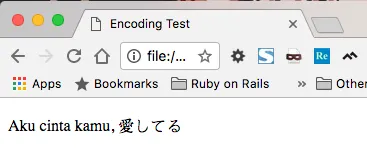
<meta charset="utf-8" />There are many character encoding options available, but the HTML specification strongly recommends using UTF-8 because it covers the most characters from various languages. As an example, here are two identical strings, displayed in UTF-8 and ISO-8859-1 encoding.
Text displayed with UTF-8 encoding:
Text displayed with ISO-8859-1 encoding:
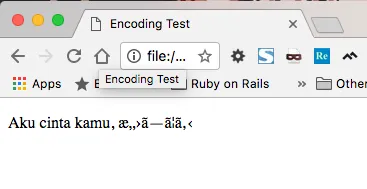
ISO-8859-1 encoding cannot display Japanese characters, while UTF-8 can. Cases like this are why W3 recommends always using UTF-8 encoding.
Some encodings are even forbidden from use because they have been proven to open vulnerabilities to XSS (Cross Site Scripting) attacks. These are CESU-8, UTF-7, BOCU-1, and SCSU.
Linking a CSS Document
The CSS document used to beautify the presentation of an HTML document can be linked using the <link> tag in the head section. The <link> tag can actually be used to link various things through its rel attribute. To link a CSS document, we use rel=stylesheet.
<link rel="stylesheet" href="styles.css" />The <link> tag actually has many uses beyond linking CSS documents. If you are interested, you can read the full documentation in the official HTML specification about links.
Linking a Javascript Document or Code
Javascript documents or code are attached to an HTML document with the <script> tag. In addition to being placed inside the body section, the <script> tag can also be placed inside the head. Here is an example of basic <script> tag usage.
<script src="https://code.jquery.com/jquery-3.2.1.js"></script>

<script type="text/javascript">
  $(document).ready(function () {
    console.log("Saya berada di head!");
  });
</script>
Scripts placed in the head section are advised not to be scripts that have dependencies on the DOM. This is because Javascript code placed in the head can be executed before the entire HTML document has finished loading, and can cause errors if the code tries to access the DOM in the HTML. Typically, scripts placed in the head section are scripts used for tracking, authentication, or displaying advertisements.
Describing the Site’s Title and Description
Search engines need to know the semantic meaning of an HTML document to properly place it in their search index. The effort to improve the clarity of the semantic meaning of a site to maximize its position in a search engine’s index has even spawned a popular field of expertise called Search Engine Optimization.
One of the things that can be done to clarify the meaning of an HTML document is to give it a title and description that is relevant to the content it presents, with the help of metadata.
<title>Perjalanan Fulan Bertanding Sampai ke Ibukota | Jurnal Fulan</title>
<meta
  name="description"
  content="Setelah melalui berbagai rintangan dan menaklukkan puluhan lawan, akhirnya Fulan bisa menapakkan kaki di Jakarta untuk mengikuti babak final Indonesia Open"
/>
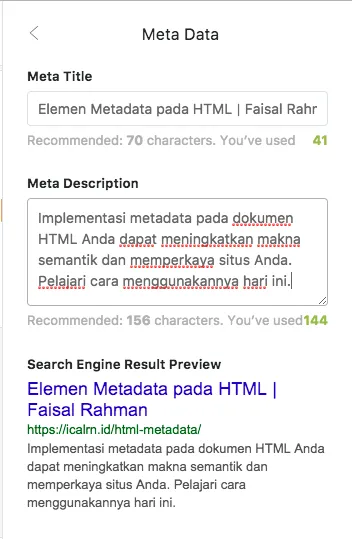
There are many opinions and tips on the internet about how we should craft the title and description of our web pages to have an optimal score in the eyes of search engines. The basic tips most commonly cited relate to the length of each of those metadata items; the Ghost platform, for instance, recommends the title be 75 characters long, while the description be 156 characters.
To give an idea, here is a visualization of the metadata input I did on the Ghost platform.
Social Media Presentation Tags
Have you ever shared an article or URL on social media, and then the social media platform generated an image and text related to that URL? Take Facebook as an example:
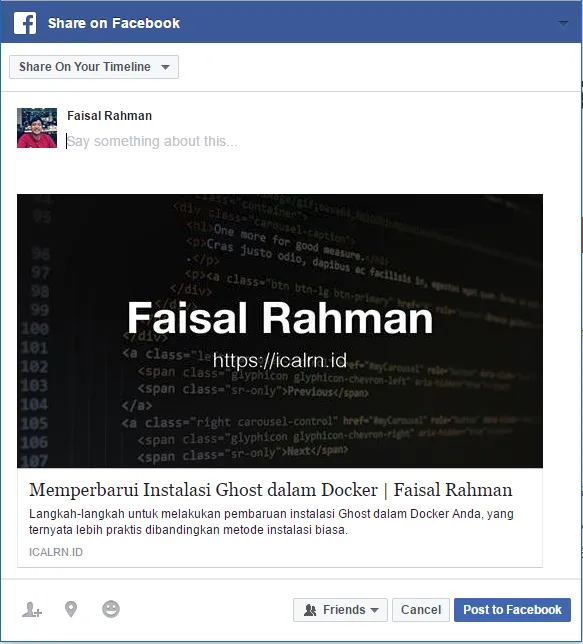
The additional information in the form of images, titles, and descriptions on the links we share enriches our content and is useful for inviting social media users to visit our site. Facebook calls the presentation of our content — in this case a link to an article on a blog — a rich object. To embed enriching information in our content, Facebook created and uses the Open Graph protocol, where we can describe this information through predefined metadata tags.
Results like the above can be achieved with the four most basic Open Graph metadata properties that are required if we want to use Open Graph, namely og:title, og:type, og:url, and og:image.
<meta
  property="og:title"
  content="Memperbarui Instalasi Ghost dalam Docker | Faisal Rahman"
/>
<meta property="og:type" content="article" />
<meta
  property="og:url"
  content="https://icalrn.id/memperbarui-ghost-dalam-docker/"
/>
<meta
  property="og:image"
  content="https://icalrn.id/content/images/cover-image.jpg"
/>
Besides Facebook, Twitter also has a content enrichment feature like that, which is also accessed through metadata. Twitter implements content enrichment through the metadata properties twitter:card, twitter:url, twitter:title, twitter:description, twitter:image, and many more. Some of Twitter’s content enrichment properties have a fallback to the Open Graph API, so for those properties we can use Open Graph metadata.
<meta name="twitter:card" content="summary" />
<meta
  name="twitter:url"
  content="https://icalrn.id/memperbarui-ghost-dalam-docker/"
/>
<meta
  name="twitter:title"
  content="Memperbarui Instalasi Ghost dalam Docker | Faisal Rahman"
/>
<meta
  name="twitter:description"
  content="Langkah-langkah untuk melakukan pembaruan instalasi Ghost dalam Docker Anda, yang ternyata lebih praktis dibandingkan metode instalasi biasa."
/>
Here is the result of those metadata settings.

Note that I did not set the twitter:image property but the cover image is still displayed. This is because twitter:image has a fallback to og:image that was set previously.
Further Reading and References
- MDN: What’s in The Head?, explains the head section of HTML and its contents.
- MDN: meta, a reader-friendly documentation about the element.
- W3C: Character Encoding for Beginners, an introductory guide to character encoding in HTML.
- W3C: HTML specification on the link tag, the comprehensive official HTML specification for
<link>. - The Open Graph Protocol, the home page and comprehensive documentation for the Open Graph protocol.
- Twitter Developers: Twitter Cards, documentation about the Twitter metadata API.
Hope this helps!