

Lint Your Code!
Back in the days of Unix V7, around 1979, a program called Lint was introduced and shipped with that operating system. Lint is a program that helps C language programmers analyze the code they write and points out parts of the code that might cause bugs in the program. The name Lint itself comes from an English noun meaning the small, unwanted fluff found on wool products.
Today, the term has become a common label for source code analysis tools across a wide variety of languages. Examples include ESLint for JavaScript, scss-lint for Sass, Pylint for Python, coffee-lint for CoffeeScript, and others. The word lint as a verb has also become common parlance among programmers, meaning to perform static analysis on source code to find stylistic errors or even programming mistakes. Some static analysis tools don’t use the word lint in their name but still exhibit behavior similar to Lint — for example, Rubocop for the Ruby programming language.
A Linter in Action
To demonstrate how a linter generally works, I will demonstrate the use of ESLint on a file in my Node.js + Express project. A local installation (available only within the active project) can be done by executing npm i eslint --save-dev and initialized by running ./node_modules/.bin/eslint --init.
During initialization, we can choose to use a popular configuration. This configuration, which contains code style rules, will serve as the linter’s guide when analyzing our code. In this demonstration I am using the Airbnb configuration.

A detailed explanation of the Airbnb configuration can be found here. Next, here is the file that will be evaluated by ESLint — this JavaScript file is the entry point for an Express-based Node.js application.
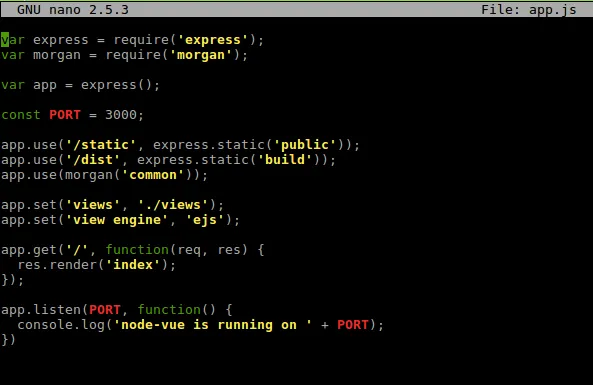
The code works fine, but does it meet the (high) standards set by Airbnb? Let’s evaluate it with ESLint.
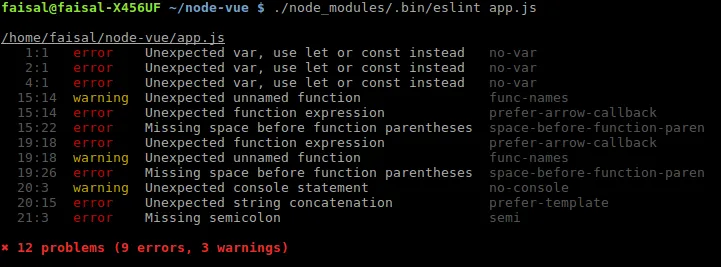
It turns out there are 12 problems — 9 errors and 3 warnings — in what is only a few lines of code. In addition to counting the number of ‘violations’ against the configuration we’re using, ESLint also tells us the location and type of each violation it finds in our code. This can serve as an illustration of how modern linters work — broadly speaking, all linters operate on the same principle as this.
Is Linting Mandatory?
In my view, linting should be performed on as large a proportion of the code we write as possible. I personally make it a rule to check my code with a linter before every commit to a Git repository. This is particularly important for improving the quality of the code we write, reducing the likelihood of bugs appearing, and training ourselves to write clean code.
However, it is important to remember that a linter only evaluates the style of the code — the quality of the program’s logic is still determined by the programmer’s own capability. In fact, we sometimes encounter cases where the linter’s suggestions would actually break the logical flow we’ve constructed. For that reason, we must still prioritize our own capacity as programmers when writing code, and not rely solely on the linter.
Automating the Lint Process
I mentioned that I am in the habit of linting my code before every commit. Of course, the easiest way to maintain a habit — and to guard against forgetting — is to automate the process. Git makes this automation possible through the Git Hooks feature.
Git Hooks allow us to execute a script before or after certain events in the Git workflow. Some of these include pre-commit, which executes before every git commit; post-commit, which executes after git commit; post-merge, which executes after git merge; and others, all documented with examples here.
The idea is that we can execute the linter with a script placed as a pre-commit script. This way, our code will be linted before it can be committed, and if the linter reports any violations in our code (via its exit code), the commit process will be cancelled by Git. I’ll cover this in more detail elsewhere.
By linting regularly, we’ll find that the code we write becomes progressively cleaner and more consistent. Beyond that, we can also reduce the burden on our code reviewers and reduce the potential for bugs to appear in our programs.