

Automation with Git Hooks
Every task done repeatedly is a good candidate for automation. That includes working with Git — routines performed after running a Git command are perfect candidates for automation to boost our productivity. For this purpose, Git provides a very useful utility: Git Hooks.
Git Hooks
Git Hooks are scripts executed by Git at certain events in the Git workflow. There are many events to which we can attach scripts in Git. A complete explanatory list can be found here.
The way to use them is quite simple: just create a script that can be run on our machine, then save it in the .git/hooks/ directory of our repository with the appropriate name. Don’t forget to make the script executable (sudo chmod +x script.sh). Here are the contents of a .git/hooks/ directory containing example script files:
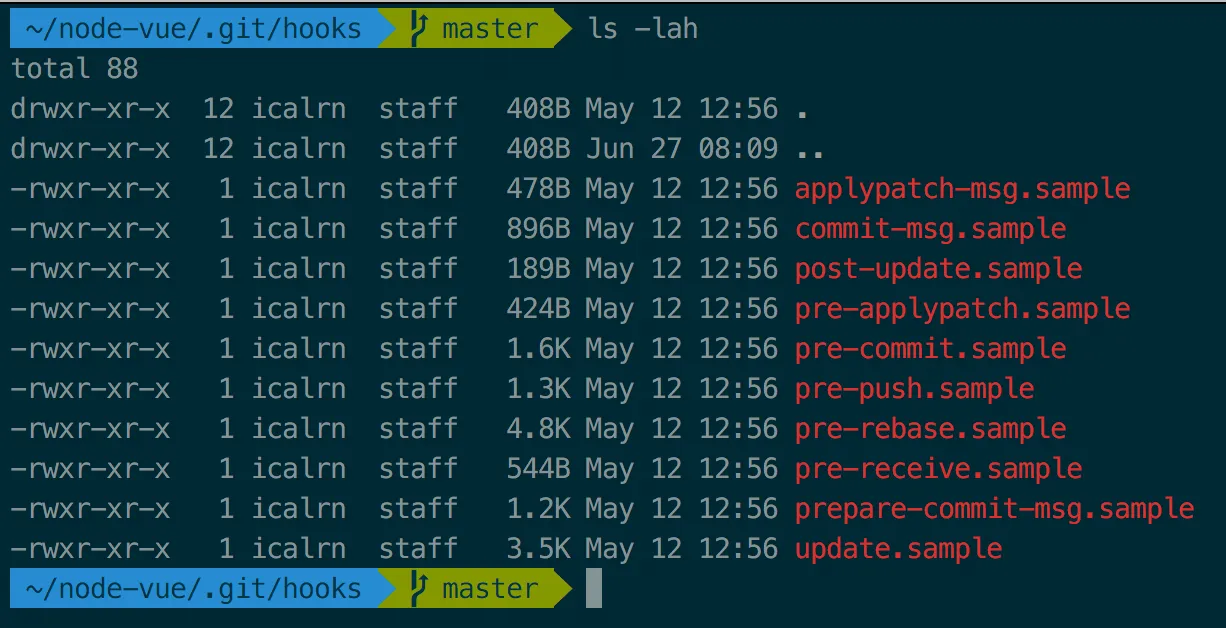
Git runs those scripts by calling them by name, so we need to declare the interpreter to be used to execute the script using the shebang notation, for example #!/bin/bash to use bash. This allows us to use a variety of languages to write our hook scripts: JavaScript, Perl, Python, Ruby, and more — as long as the interpreter for that language is already installed on our machine.
Here is an example script for the pre-commit hook written in bash. This script prints the branch we currently have checked out, followed by a prompt to either proceed with the commit or cancel. Its sole purpose is just to remind us not to commit to the wrong branch.
#!/bin/bash

branch=$(git rev-parse --abbrev-ref HEAD)

printf "Currently on branch \e[33m$branch\e[0m\n"
echo "Continue with commit?"
select yn in "Yes" "No"; do
    case $yn in
        Yes ) exit 0; break;;
        No ) exit 1;;
    esac
done
As stated in the documentation, the pre-commit hook will cancel the commit if the exit code of the script we run is not 0. Therefore, in the bash script above, when the user selects Yes, the commit process will continue; when they select No, it is cancelled. If we ever need to disable (bypass) this hook, we can use the --no-verify flag when executing a commit: git commit --no-verify.
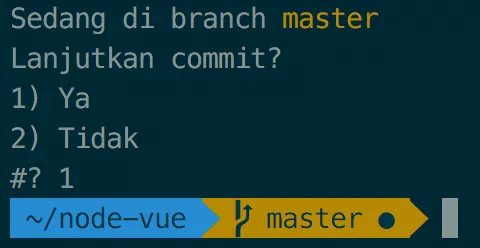
Because Git Hooks are fundamentally just scripts running on our machine, what they can do is limited only by our imagination. The example in this post only covers pre-commit, just one of the many hooks Git provides.
You can imagine how powerful the Git Hooks feature is for automation: Want to run a linter before every commit? Want to automatically populate commit messages? Or want to copy your working directory after every commit? Go ahead — imagine it, plan it, and build your own hook!